core:undotree
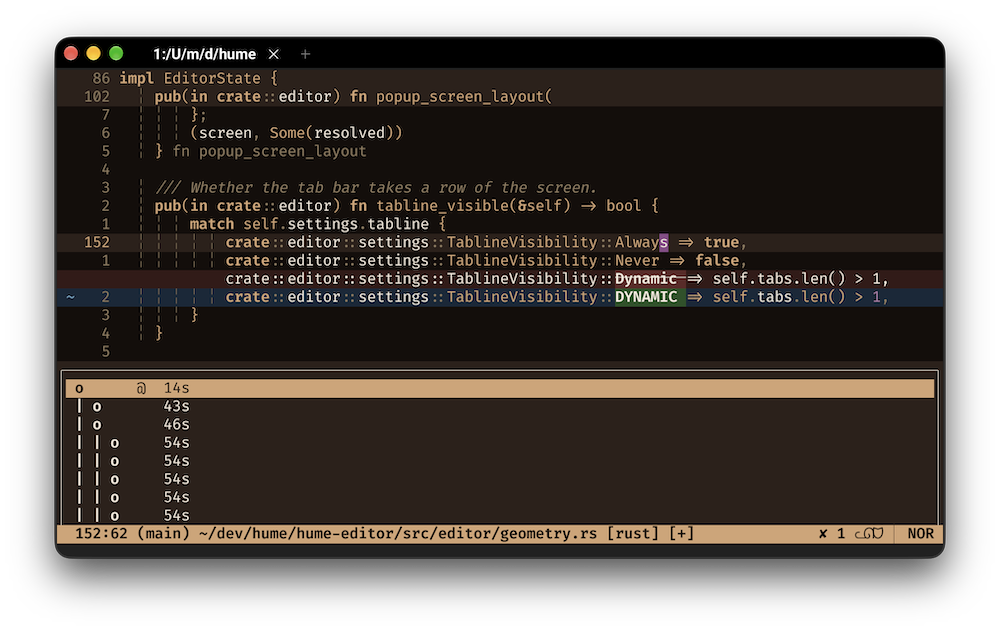
A graph of the buffer's undo history in the bottom drawer, with a jump to any revision in it, including a revision on another branch.
(load-plugin! "core:undotree")It needs no other plugin, but shows what each revision changed only when core:git-diff is loaded too (see Showing what a revision changed).
| Command | Effect |
|---|---|
:undotree | Open the focused buffer's undo tree in the drawer, or close it if it is open |
undotree/toggle | The same, as an editor command you can bind to a key |
The plugin ships no key. Bind one in your init.scm:
(bind-key! 'normal "z u" "undotree/toggle")Reading the tree
Each row is one revision: the graph, a marker column, and how long ago it was made. Newer revisions are on top, a branch is a column of its own, and o-' is a branch joining the revision it grew from.
In the marker column, @ is the revision the buffer is on and S the revision your file was last saved at:
 o          2m
 | o    @   4m
 | | o      6m
 | | o      7m
 | o-'      9m
 o-'     S 12m
The history lives in memory only, so it starts fresh each time you open a file.
Moving through history
The drawer opens with the highlight on the current revision. Down/Up move the highlight and Ctrl-d/Ctrl-u page it, as in the language server lists.
Enter moves the buffer to the highlighted revision and leaves the drawer open, so you can step through history one revision at a time. Esc closes it. After a jump, U and Ctrl-r redo along the branch you jumped into.
While the drawer is open:
- It follows the buffer: it redraws after an edit, an undo or a redo, and switches to the new buffer when you switch buffers.
- The ages stay current.
- Opening another drawer, such as the references list, replaces it.
- In a read-only buffer,
Enterreports an error instead of jumping.
Showing what a revision changed
With core:git-diff loaded, the buffer also shows what the revision you are on changed, drawn the way core:git-diff's inline diff draws a diff against a git ref:
- the text of its parent revision as deleted lines above the changed lines
- the changed words highlighted
- a tint on the changed lines
The diff follows every jump and edit while the drawer is open. The root revision shows nothing, and closing the drawer clears it. The diff does not depend on whether core:git-diff's own inline diff is switched on.
Without core:git-diff the drawer works the same, and opening it shows a message saying to load the plugin.
Styling
A theme styles the drawer with these scopes:
| Part | Scope | On the selected row |
|---|---|---|
| The graph | markup.bold | |
@ | diagnostic.warning.message-text | diagnostic.warning.message |
S | diagnostic.info.message-text | diagnostic.info.message |
| The whole row | diagnostic.warning.message when it has @, or diagnostic.info.message when it has only S |